

What Is the Stock Received Date?
The Stock Received Date is an optional field that allows you to record the actual date that goods physically arrived at your venue.
It is separate from the Invoice Date and is used specifically to improve the accuracy of Theoretical Stock on Hand calculations.
When enabled, the Stock Received Date field is visible on records on the Invoices & Credits and Receiving Order pages.
Why Do We Have This Feature?
In many cases, the Invoice Date does not reflect the actual date the goods were delivered. For example:
-
The supplier sends the invoice days before delivery
-
The invoice is issued after the stock has already been received
-
An invoice arrives after a stocktake, even though the stock was delivered earlier
This causes issues in the Variance Report:
-
The system attributes stock movements to the Invoice Date
-
If the invoice date falls after the closing stocktake, the system assumes the stock arrived late
-
This results in inflated shortages that do not reflect reality
Because changing the Invoice Date can interfere with accounting, the Stock Received Date provides a safe and accurate way to:
-
Record the true delivery date
-
Ensure stock is correctly attributed to the right stocktake
-
Eliminate false variances
-
Keep financial reports untouched (Invoice Date remains unchanged)
Important: The Stock Received Date only affects Theoretical Stock on Hand calculations. It does not affect financial reporting.
How to Enable Stock Received Date
The Stock Received Date setting is enabled at the Corporate level.
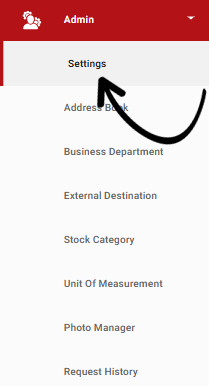
To enable the Stock Received Date setting, from the navigation bar, expand the Admin heading and open the Settings page:
In the Main Settings tab, locate the Stock Settings section. There you will find the option called Enable Stock Received Date on Invoices for Theoretical Stock on Hand calculations.
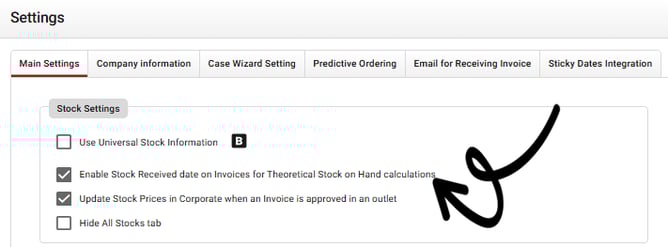
Once this option is switched on, all users in the database will be able to enter and update the Stock Received Date on invoices from both the Receiving Orders page and the Invoices & Credits page.
Where You Can See and Edit the Stock Received Date
Once the feature is enabled, a new field called Stock Received On appears on invoice records. You can access this field on both the Receiving Orders page and the Invoices & Credits page. When you open any invoice, you will see the Invoice Date as usual, along with the new Stock Received Date field, which allows you to enter the actual date the goods were physically received.

After the date is entered, the system will use the Stock Received Date—rather than the Invoice Date—when calculating Theoretical Stock on Hand and when determining how stock movement aligns with stocktake periods. This ensures that reports such as the Variance Report accurately reflect stock that was received before a stocktake, even if the invoice was issued afterward.
You can return to the invoice at any time to review or adjust the Stock Received Date if further corrections are needed.
Example: How It Affects Variance
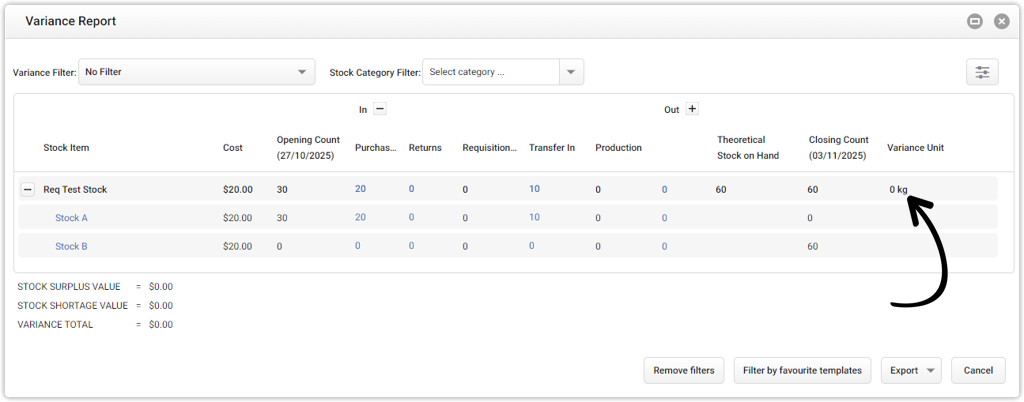
Before Using Stock Received Date (Incorrect Variance)
-
Invoice Date: 3 Nov 2025
-
Stocktake occurs on: 3 Nov 2025
-
Actual delivery: 31 Oct 2025
Because the invoice date falls after the stocktake, the system interprets the stock as arriving late, which creates a false variance.
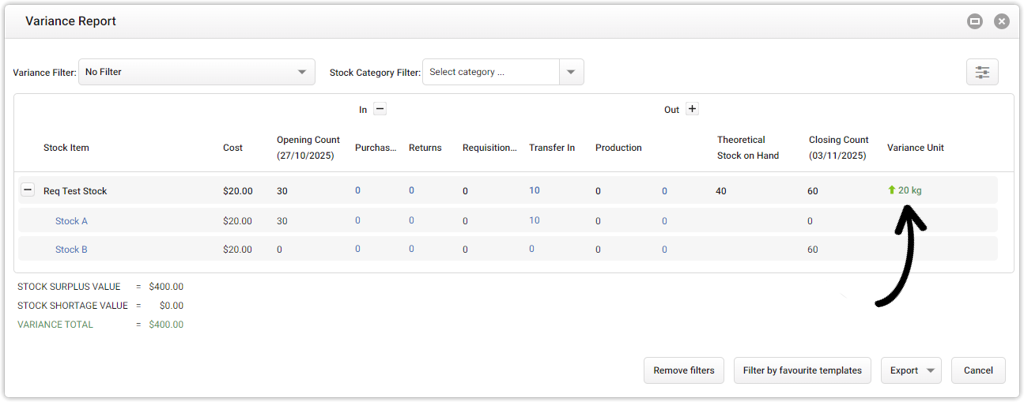
After Using Stock Received Date (Accurate Variance)
-
Stock Received Date corrected to: 31 Oct 2025
Now the variance correctly reflects that the stock was already on hand at the time of stocktake.