
Last Updated: June 10, 2026



About the Recently Used Stock Filter
The Recently Used Stock Filter allows you to automatically exclude stock items on Stock and Stocktake screens that haven’t been used within a specified period.
Instead of spending time manually cleaning up unused items, turning on this filter quickly declutters your stock lists by removing any line items you're not currently using, making it easier to see what stock is actually being used day to day.
The filter is dynamically applied to stock lists, so if an old item becomes relevant again – such as appearing on an invoice or being ordered - it will automatically reappear in your stock list.
What counts as "Recently Used"?
The filter considers stock activity based on the below records:
- Stocktake - Counted on a Stocktake
- Purchase Order - Used on a Purchase Order
- Invoice - Received on an Invoice
- Wastage - Added to a Wastage Record
- Production Records - Added to a Production Record
- Requisitions and Transfers - Used on a Requisition or Transfer
Sales data is not considered when determining whether an item is recently used.
Enabling the Recently Used Stock Filter
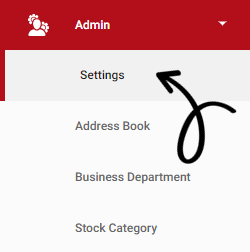
The Recently Used Stock Filter is managed per outlet. To enable these settings, go to Admin and open Settings.
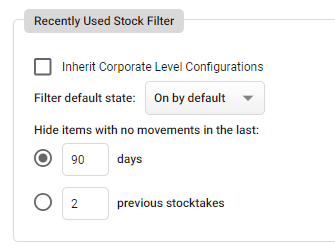
 Under the Main Settings tab, scroll down to Stock Settings.
| Setting | Purpose |
| Inherit Corporate Level Configurations | The lower outlet will inherit the Filter by Stock Movement settings configured at the corporate outlet |
| Filter default state | Whether Filter by Stock Movement is enabled or disabled by default when users access the Stock and Stocktake screens |
|
Hide items with no movements in the last [x] days |
The number of days in which stock movement must occur for an item to remain visible in your stock list. Items with no movement during this period will be hidden |
|
Hide items with no movements in the last [x] previous stocktakes |
The number of previous stocktakes in which stock movement must be recorded for an item to remain visible in your stock list. Items with no movement since the first stocktake during this period will be hidden |
You can configure the Filter by Stock Movement using either the [x] Days option or the [x] Previous Stocktakes option. Only one method can be selected and applied at a time.
Accessing the Recently Used Stock Filter
You can find the Recently Used Stock Filter on any page that displays your supplier stock lists, as well as on your stocktake page. This includes areas like Stock Maintenance, Purchase Orders, Requisitions, and more!
The filters status will be determined by the Filter default state setting.
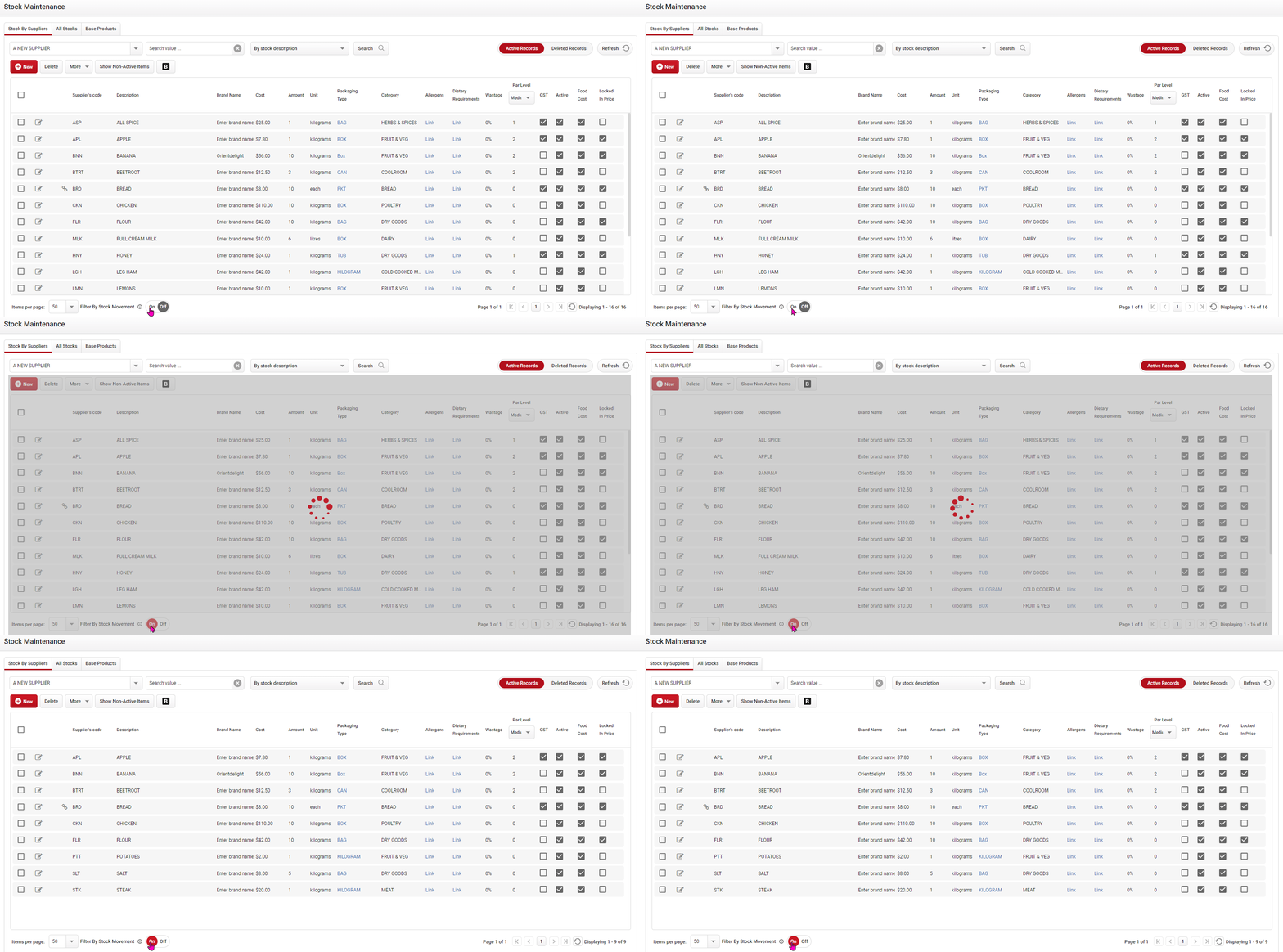
Click image to enlarge
Hovering over the info icon will let you know which setting is currently being used.
 The Recently Used Stock Filter can only be applied to Parent Stocktakes and Dynamic Templates. Users creating or using Stocktake Templates will not see this filter option available at the bottom of the screen.
Any stock items that are already counted on a Stocktake will remain visible, regardless of the filter settings.
The Recently Used Stock filter will not be applied to any Purchase Order, Wastage and static Stocktake Templates.